
Flashcards with real context
The word on the front; the meaning and the very sentence you met it in on the back. Rate yourself Again, Hard, Good or Easy and the app adjusts your schedule.
The vocabulary app for people who read
Wordcatch saves words from everything you read – web pages, PDFs, books – together with the sentence you found them in, translates them into your language and reminds you right before you forget.
Catch words in the language you are learning, read them in yours
Why Wordcatch
Ready-made word lists fade fast because they have no context. Wordcatch turns the words you stumble on into flashcards with their original sentence, then handles the reminders so you can keep reading.
Hit an unfamiliar word in an article, a document or a PDF? Add it to Wordcatch in one tap; the sentence around it is saved as context.
The app translates the word as it is used in that sentence, tags its part of speech and translates the whole sentence into your language.
The FSRS algorithm schedules each review right before you would forget. Review less, remember longer, no planning needed.
Features
The word on the front; the meaning and the very sentence you met it in on the back. Rate yourself Again, Hard, Good or Easy and the app adjusts your schedule.
A few words from your review queue show up on your lock screen, spread from morning to evening. A glance is a review – no need to open the app.
You set a daily card budget. Review well and the app adds new words; forget a lot and it pauses so you can consolidate. Never overwhelming.
Words, review schedule and settings sync to your account. New phone or fresh install – sign in and everything is back.
Add words and review on the subway or a plane. Everything syncs once you are back online.
Choose the language you are learning and the one to translate into. The interface is available in English and Vietnamese.
Chrome extension
The Wordcatch extension for Chrome sends words straight to your account. Open your phone and they are already in your review list, with meaning and original sentence.
Uses the same account as the app. Works in Chrome, Edge, Brave and other Chromium browsers.
Download
Point your phone camera at the QR code. Already on your phone? Tap the button below.
How it works
Download Wordcatch from the App Store or Google Play and sign up with email or Sign in with Apple. Your account keeps all your data.
Choose the language you are learning, the language to translate into and how many cards a day you want (20 by default). Change them anytime in Settings.
Tap add, type the word and paste the sentence you found it in. The app fills in the meaning in context, part of speech and a translation of the sentence.
The home screen shows how many cards are due today. Flip each card, rate it Again Hard Good Easy and FSRS does the rest.
Allow notifications on first launch to get a few words a day on your lock screen. Toggle it anytime in Settings.
Open Wordcatch on the Chrome Web Store, click Add to Chrome, then pin the Wordcatch icon to your toolbar.
Click the Wordcatch icon and sign in with the email and password you use in the app.
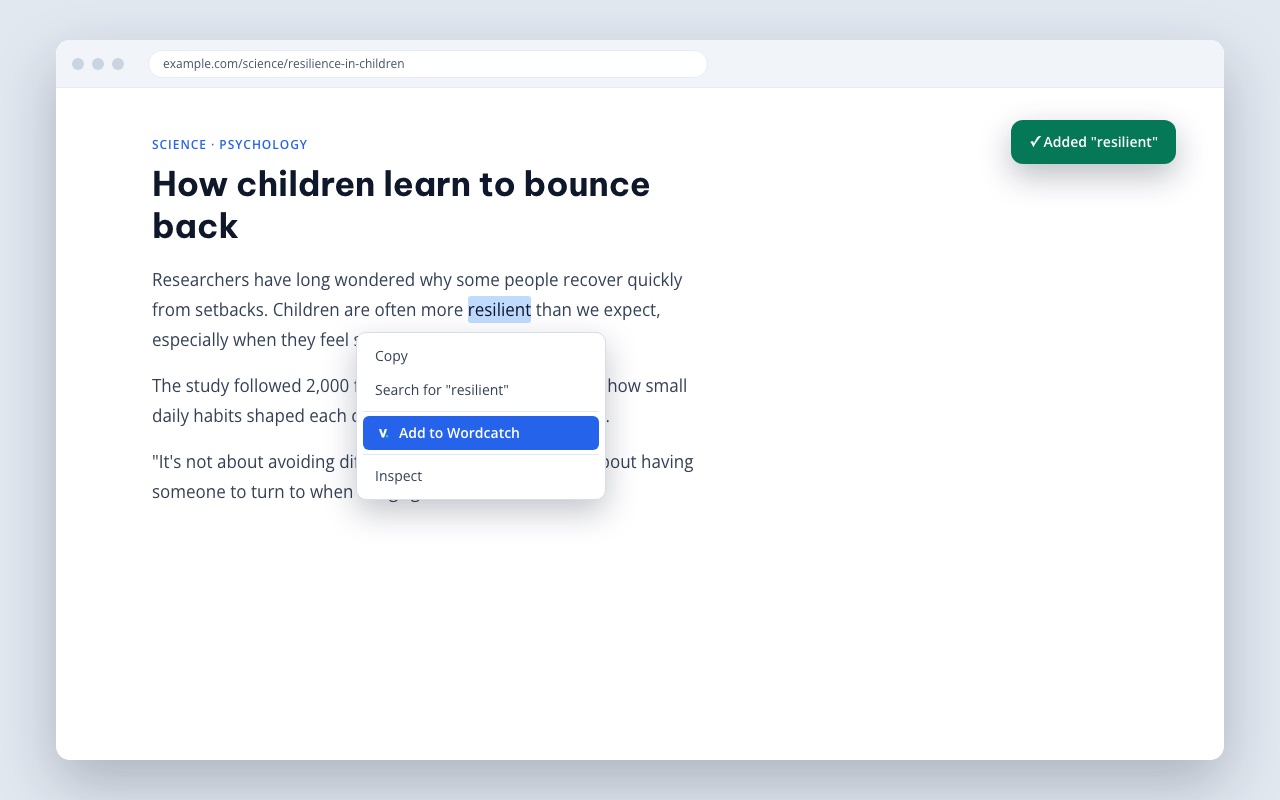
Select a word, right-click and choose Add to Wordcatch or press Alt + Shift + V. Select a whole sentence to tick the words you want.
Open the app: the words you just added already have their meaning and sentence, ready for review.
In the popup, tick Show the Add word button when selecting text on any website. Useful on sites that block the right-click menu.
FAQ
Yes. The app on the App Store and Google Play and the extension on the Chrome Web Store are free to download.
You can save words in many languages such as English, Japanese, Chinese, Korean and French, and pick the language they are translated into. Level-based suggestions of new words are available for English today; other languages are on the way.
FSRS (Free Spaced Repetition Scheduler) is an open-source spaced repetition algorithm. It estimates when you are about to forget a word and schedules the review for that moment, so you review less and remember longer.
No. Your words, review progress and settings are synced to your account. Sign in on the new device and everything comes back.
Yes. The app works offline and syncs when you are back online. The Chrome extension also queues words while you are offline.